 NextEraSolutions
Mobile CI/CD and test automation for teams that can't afford a bad release
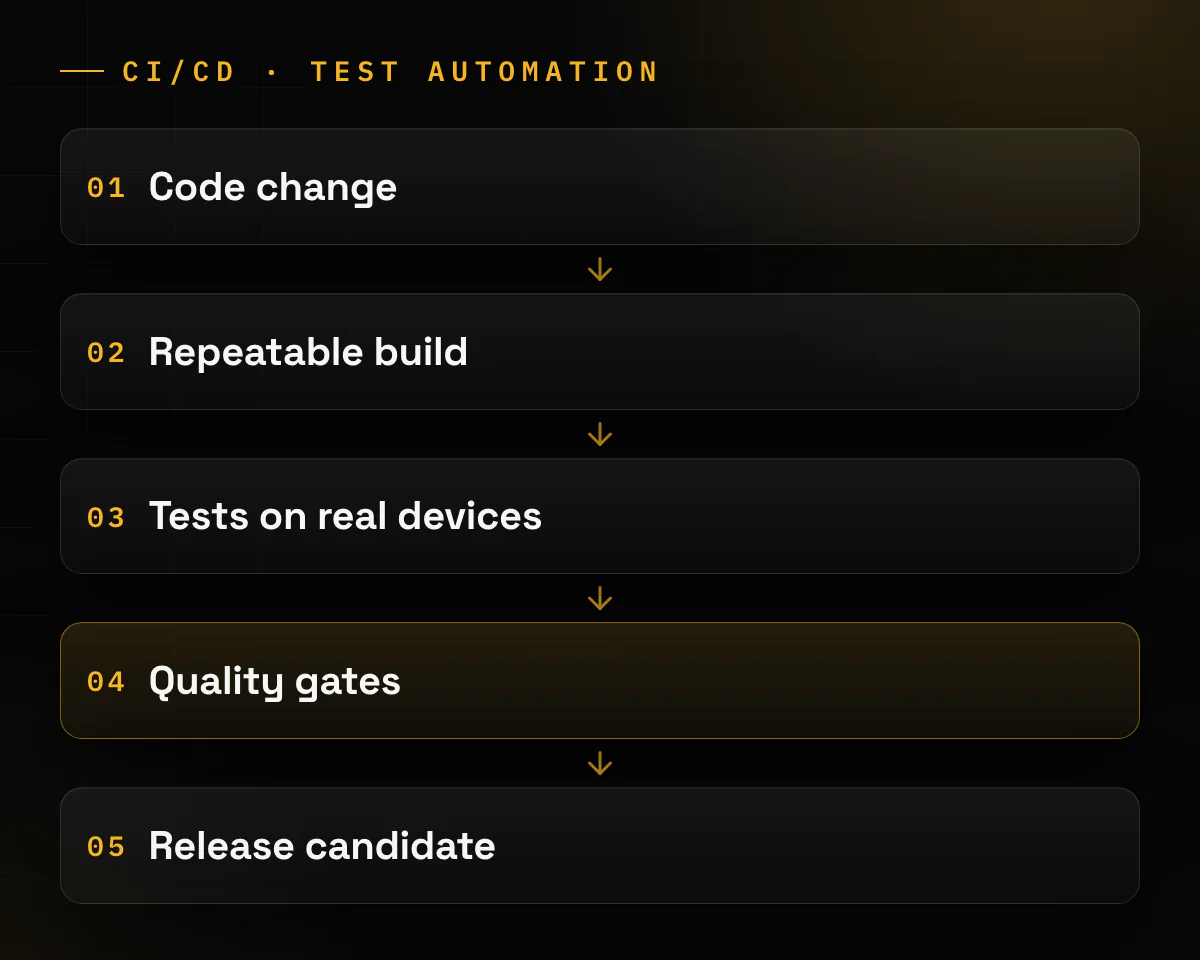
Next Era Solutions sets up the path from a code change to a release candidate, the build you would ship. You get builds anyone on your team can repeat, automated tests on real devices, and checks that stop a bad build before it reaches your users. Your team can run it without us. CI/CD in plain terms: an automated line that builds, tests and prepares every change for release, so nobody does it by hand.
Start with a mobile app audit: the report covers your build and release setup (CI, signing, versions, manual steps) and who holds your keys and store accounts. Or book a 30-min call and bring your current pipeline. Client review on Upwork for our Flutter test-automation work on MobileVision (Yuval Ashkenazi, iMDsoft, Israel): "They succeeded to connect our app to work with Browserstack and find also issues related to our automation test."
Is this you?
A release depends on one person.
The build only works on their laptop, or the signing keys live there.
You have automated tests, but nobody trusts them.
They fail at random, pass only on an emulator, or run so slowly that people skip them.
A bad release stops someone's work.
A nurse on a shift, a cashier at a till, an engineer in the field. For them a regression costs more than a bad review.
Your Flutter integration tests run one file at a time, or only on a laptop.
You want the whole suite on real devices in CI.
Store rules catch you at upload time.
A new Xcode, a target API bump, and next the 16 KB page-size rule.
What you get
- A build and release pipeline that makes the same build from the same commit, with no steps on someone's laptop.
- Automated tests in CI on the trigger you choose: every pull request, nightly, or a release branch.
- Quality gates that can stop a release candidate: failed tests or a coverage rule. A store-rule check from the table below can stop a build the same way.
- Tests on real devices in a device cloud, a service that runs your tests on phones and tablets it hosts. On MobileVision we connected the Flutter tests to BrowserStack and Firebase.
- Test data without real personal data. On MobileVision the tests had to work without exposing real patient data.
- Keys and store accounts, as agreed. The contract sets who holds the signing keys and store accounts: your Android upload key, your Apple certificates, your Google Play and App Store Connect accounts. Often they are in your company's name from day one, and we work in them through user roles you grant and can remove. On some projects, an MVP especially, they sit on our side while we build, to move faster, and are transferred to you afterwards. The apps we built for Merezha Prava, for example, are published under the client's own developer accounts (Google Play and App Store listings checked 23 September 2026). With Play App Signing, Google stores the key that signs your app; if the separate upload key is lost, the account owner can ask Google to reset it (Play Console Help, read 23 September 2026).
MobileVision
Our role: the CI/CD pipeline for the Flutter app, test automation and the real-device test runs. The app and its clinical features are the client's product.
MobileVision is a clinical mobile workflow product. It helps nurses work with patient tasks and information away from a fixed workstation. A regression there can interrupt time-sensitive work. So the team needed repeatable builds, automated checks and fewer manual release steps. We also migrated its CI/CD, with automated test runs and quality gates before each release candidate. "We hired Oleksiy for an automation testing project in Flutter, and we couldn't be happier with the results." (Client review on Upwork, for the batch-run fix.)
Read the MobileVision case →- We connected the app's Flutter automation tests to BrowserStack and Firebase. The BrowserStack runs on real devices found issues in the automation tests themselves
- We fixed the Flutter test setup so the whole suite runs as one batch
- We added missing tests and made the suite run on BrowserStack for both platforms, on the triggers the client needs
- We migrated the CI/CD flow and built a full CI/CD pipeline for the Flutter app, with automated test runs and quality gates. The pipeline builds the apps and sends them to the stores
- 3 release layers between a code change and a release candidate: build, test and coverage (the case study's description of the result)
More work inside release pipelines
Automotive Radio System · client under NDA
Our role: Android AOSP engineers inside a car maker's infotainment program.
The program's stack lists CI/CD pipelines, Jira and Git, and our engineers worked inside it. This is the model if you already have a pipeline and need engineers who follow its rules.
6 mo engineering engagement
Read the case →How it runs
| Step | What happens | How long |
|---|---|---|
| 1. First call | Your app, your current pipeline, how you release today, and what went wrong last time. | 30 min |
| 2. Audit | Read-only access to your repository and CI. The mobile app audit report says what to fix first; one section covers the build and release pipeline. | As stated on the audit page |
| 3. Proposal | What we change, in which order, and what you have after each step. | Depends on scope |
| 4. Build in layers | Three layers: a repeatable build, tests in CI, and coverage and quality gates. | Depends on scope |
| 5. Real devices | Tests run on real devices in a device cloud. | Part of step 4 |
| 6. Your team takes over | Your team runs and extends the pipeline. | Depends on scope |
| 7. Afterwards | If you want our support after that, you choose: a monthly retainer, or hours as needed. | Optional |
- Five questions to ask about your pipeline today. 1. Can someone other than the usual person build a release from a clean checkout? 2. Who holds the signing keys, the certificates and the store accounts? 3. Do your tests actually stop a bad release, or do they only run? 4. Would your next upload pass the store rules listed under Technical depth? 5. How many manual steps sit between a merge and a release candidate? If you can't answer two of them, start with the mobile app audit. It checks all five: build and release, ownership, whether tests gate releases, and store readiness.
Pricing
- Rates are per engineer: about $30–$90 an hour, depending on level and experience. No minimum project size. We invoice in USD or EUR (GBP possible), on net 14 or net 30 terms.
- A proposal before work starts, based on what the audit or the first call found.
- Tool costs are separate from our hours. CI minutes and device-cloud plans are billed by those vendors.
- What moves the price most: how many apps and platforms you have; the state of the existing tests (a flaky suite has to be fixed before it can gate anything); the size of the device list; how many manual release steps there are today; whether a regulated customer needs an audit trail of releases.
- The app cost calculator prices whole apps, not pipeline work. Use it if the pipeline comes with a new build.
Technical depth
Flutter tests on real devices: what has to be set up
Flutter's integration_test suites run on a laptop with one command. A device cloud needs more setup.
| Platform | What has to be set up | Where we did it |
|---|---|---|
| Android | The device cloud needs two files, the app APK and a separate test APK, both built with Gradle. Flutter's own instructions build the test app for one test file at a time (-Ptarget=integration_test/<name>_test.dart). To run the whole suite in one device run, the suite needs a single entry point. (Flutter docs) | MobileVision |
| iOS | The tests run as an Xcode test bundle. You build it with xcodebuild build-for-testing and upload it as a zip with its .xctestrun file. A small RunnerTests entry file runs the Flutter tests inside it. (BrowserStack docs) | MobileVision |
On MobileVision we fixed the client's Flutter suite so it runs as one batch, and the pipeline runs it on BrowserStack for both platforms, on the triggers the client needs. The BrowserStack runs on real devices found issues in the automation tests themselves.
Tools we have used on client work
BrowserStack App Automate, for Flutter tests on real devices (MobileVision). Firebase, for device-cloud test runs (MobileVision).
Store rules your pipeline should catch before the store does
A rule change should fail in CI, not at upload or in store review. Last checked: [TEAM SUPPLIES: date at publish (all read 2026-09-23)] The full dated list, including Android developer verification in 2027, is in our store-rules post.
- Google Play target API (from 31 Aug 2026). New apps and updates must target Android 16 (API level 36). Extension to 1 Nov 2026 on request. Check: fail the build if the built app's targetSdkVersion is below 36. Google Play Console Help
- 16 KB memory pages (from 1 Feb 2027). Apps targeting Android 15 or higher must support 16 KB memory pages on 64-bit devices. Updates without it can't be released. Check: for an APK, zipalign -v -c -P 16 4 app.apk should end with "Verification successful". For an app bundle, bundletool dump config --bundle=app.aab | grep alignment should show PAGE_ALIGNMENT_16K. Android Developers
- App Store build tools (since 28 Apr 2026). Uploads must be built with Xcode 26 or later and a 26-series SDK. Check: fail the release job if xcodebuild -version on the build machine reports an Xcode older than 26. Apple, Upcoming requirements
- App Store minimum iOS (since 9 Sep 2026). iOS and iPadOS uploads must target iOS 13 or later. Check: fail the build if the iOS deployment target is below 13.0. Apple, Upcoming requirements
Who you'll work with
A senior team. Our engineers work remotely across Europe, from the UK to Portugal, the Nordics and DACH, and a few work in Ukraine.
 Oleksiy Kazavchynskyy, CEO: takes the first call and leads discovery. Our founder has 8+ years building mobile. The client reviews on Upwork for the MobileVision work name him.
 Andriy Kazavchynskyy, Co-founder, responsible for delivery; your staffing contact.
- Dmytro, Business analyst and project manager
[TEAM SUPPLIES (review step): add "Reviewed by <name>, <date>" only after that person reviews the page]
FAQ
No. Our named client reviews are about Flutter test automation. Our Android engineers have also worked inside a car maker's CI/CD pipelines on the Automotive Radio program. We build native Android apps and iOS apps too.
It depends on the agreement. Often they are in your company's name from day one, and we work through roles you can remove. On some projects, an MVP especially, they sit on our side while we build and are then transferred to you. The details are under Keys and store accounts, in What you get.
Yes. On MobileVision it was a requirement: the tests had to work without exposing real patient data.
Your team runs the pipeline. If you want our support after that, you choose: a monthly retainer, or hours as needed.
With AppVanta OÜ, an Estonian company (reg. 17188835, VAT EE102858846). Next Era Solutions is its trading name. So your contract is with an EU company. Our engineers work remotely across Europe.
Test environments sometimes hold personal data. How personal data is handled and transferred is agreed in writing for each project. Ask us.
We can usually start within one working week of your request.
Tell us how you release today.
The CI you use (if any), the tests you have, and what went wrong last time. Or start with a mobile app audit.
Oleksiy replies within 1 business day.