

Short answer. Start with what the app has to do, not with a framework. If it ships the same features on iPhone and Android, and doesn't reach deep into hardware or the operating system, start with a shared codebase. Our own cost calculator recommends that by default, because two fully native apps add about 70% to the hours. Two of our apps that are live in the stores today, Rethought and Gamble Count, are built in Flutter. We go native when the app lives close to hardware or inside the OS, and we mix the two when only one part of the app needs it. Below is where that line fell on real products we worked on.
Where this comes from
Andriy Kazavchynskyy, our co-founder responsible for delivery, posted the short version on LinkedIn on 13 July 2026: the answer we give after 25+ delivered projects. In short, a shared codebase fits when both stores launch together on one budget and the app is built mainly from screens, lists, forms and common integrations. Native is worth the extra cost when the product relies on hardware, work in the background, heavy camera use or processing on the device, or needs tight control of performance. This post is the long version: one row per constraint, with the project where we met it.
Three questions we ask first
- Does the app talk to hardware, or to a system feature, that only has a native API? Scales, receipt printers, a car's radio tuner, Apple's Screen Time controls. If yes, native code is coming either way. The only question is how much of it.
- Does it need both stores, with the same features, from the start? If you only need Android, or only iPhone, there is nothing to share. Build native for that platform.
- Who will look after it in two years? If you already have a team and an app that works, native or Flutter, their stack is usually the right one. A rewrite means paying for the same features twice.
Everything else (sign-in, lists, forms, documents, payments, push notifications) works well either way. It rarely decides the question (see What doesn't decide it below).
The decision matrix
Each row is a constraint we met on a real project. The role matters: on several of these projects, our engineers joined the client's own team. The rows run from constraints that force native code, through the ones where a shared codebase did the job, to the ones that sound decisive but aren't.
| Constraint | Where we met it (our role) | What it forces | Verdict |
|---|---|---|---|
| Store hardware: scales, receipt printers, barcode scanners, registers on a local network, offline checkout | Enterprise POS (Android engineers inside the client's core product team) | Every device is driven from Android code. Offline and multi-register logic sits close to the OS. | Native Android |
| Code inside the operating system | Automotive Radio (Android engineers on a car maker's infotainment programme, under NDA) | The radio is part of the car's own Android build and talks to embedded hardware. App frameworks run on top of the OS, not inside it. | Native (AOSP). Not an app-framework choice at all |
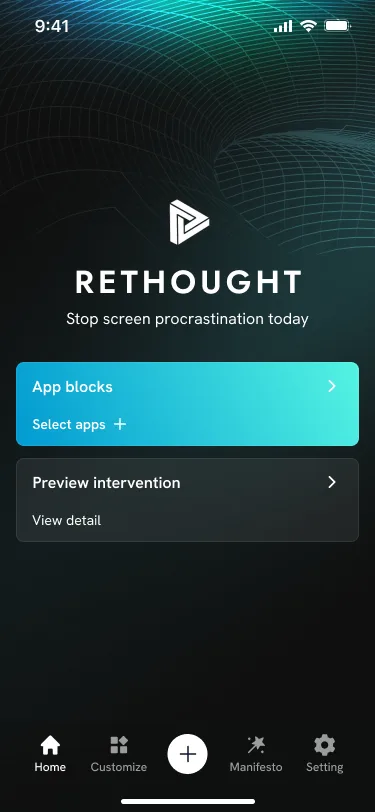
| Apple Screen Time controls | Rethought (we built the app for a Swiss client; on the App Store since June 2026) | Apple's Swift frameworks, an entitlement Apple must approve, and app extensions the system runs. The screens need none of that. | Flutter UI + Swift for Screen Time |
| One platform only | Travel Security Kit (we designed and built the Android app) | Nothing to share. | Native for that platform |
| Joining an existing team | Dutch Bros (Android), Red Robin (our developer inside the client's team) | The client's codebase decides. | Their stack |
| Same features on both stores, standard building blocks | Gamble Count (Flutter app for a Danish client, on the App Store and Google Play). Also our calculator's default. | Nothing forces native. | Shared codebase (Flutter) |
| A Flutter app that needs a reliable release process | MobileVision (CI/CD and test automation) | Shared code still ships two apps. Both need testing on real devices. | Keep Flutter, invest in the pipeline |
| Documents, payments and push that must behave the same for every client | Merezha Prava (we built both native apps) | Nothing forces native. We chose it for control over uploads, payments and push delivery. | Native, by choice. Either would work |
| Barcode scanning with the phone camera | In-Store Picker | On its own, nothing. Flutter plugins use the same native scanning libraries. | Either |
| Subscriptions and in-app purchases | Shkaf (StoreKit, Google Play Billing) | Nothing. An official Flutter plugin covers both stores. | Either |
| Right-to-left text and many languages | In-Store Picker (English and Arabic), Shkaf (8 languages) | Nothing. Flutter's localisation handles right-to-left layouts. | Either |
We would apply the same test to other system surfaces, such as Live Activities, App Intents and CarPlay on iPhone, or tiles on Wear OS. They aren't rows here because this table only lists constraints we met on a named project.
Behind the rows
Hardware: the shop counter
On the Enterprise POS platform, our engineers built and supported the hardware layer: digital scales for weighted goods, receipt printers and Zebra printers, and barcode scanners. Several registers talked to each other over the shop's local network. Critical checkout steps had to keep working without the internet, and a cashier could hand a session over to another register.
Each of those devices talks to Android through Kotlin or Java code. A Flutter or React Native app can call that code, but only through a bridge: a platform channel in Flutter, a native module in React Native. Someone still writes the Kotlin. Then they maintain the bridge as well. When most of the hard work is device code, a shared layer saves little.
Hardware bridges are where a simple cross-platform roadmap often stops being simple.
Inside the OS: the car radio
The Automotive Radio work was not an app in the usual sense. Google describes Android Automotive OS as an operating system that runs directly on the car's own hardware. Our engineers worked on the radio features inside the car maker's Android build: AM/FM and HD Radio, station browsing and now-playing screens, all working with specialised embedded hardware.
Cross-platform frameworks build apps that run on top of an operating system. This work was part of the operating system. There was no framework choice to make.
System features: Screen Time on iPhone
Rethought helps people pause before they open an app that distracts them. It has been on the App Store since 23 June 2026 and needs iOS 16 or later. On iPhone, the pause runs on Apple's Family Controls and the related Screen Time frameworks, available from iOS 15. Three things stand out:
- The app needs a special entitlement, and Apple must approve it before you can submit to the App Store.
- The app picker is a system view. Your app never learns which apps the user chose.
- Parts of the Screen Time API run as app extensions that the system calls.
These are Swift APIs, and the Screen Time API only exists on Apple platforms. So we split the app:
- The screens are Flutter, one codebase for iPhone and Android.
- Everything that touches Screen Time is Swift: code in the app plus three app extensions, connected to the Flutter screens over a platform channel.
- On Android, blocking runs through a separate plugin built on Android's accessibility service.
Blocking doesn't run in the iOS Simulator, so it is checked on a real iPhone before each release.
[TEAM SUPPLIES: Rethought engineer confirms this architecture and the real-iPhone release check before publishing (source: the project README and test checklist, internal). The owner approved naming Rethought as a Flutter build (2026-09-24); the case page now says so.]
The shared code covers the screens. The part that makes the app work is native on each platform. That is what "Flutter UI + Swift for Screen Time" means in the matrix.
A shared codebase, shipped: Gamble Count
Gamble Count is a recovery-support app for a client in Denmark. People set a quit plan, see days, money and time saved on a dashboard, and keep a logbook with statistics. It is one Flutter codebase, published on the App Store and Google Play under the client's own accounts.
Nothing in that list needs special hardware or a system feature that only one platform has. That is the case where a shared codebase pays: one set of screens, one team, both stores.
[TEAM SUPPLIES: engineer confirms why we chose cross-platform here, and whether any part needed native code.]
What doesn't decide it
Some constraints sound like reasons to go native. On their own, they aren't.
- Barcode scanning. The In-Store Picker scans a barcode to confirm every item. But camera scanning is well covered: the mobile_scanner plugin for Flutter uses Google's ML Kit on Android and Apple's AVFoundation and Vision on iOS. [TEAM SUPPLIES: what actually made the picker native (dedicated scanner hardware? OCR speed? the client's existing stack?) and which platform it runs on.]
- Subscriptions. Shkaf sells subscriptions through StoreKit and Google Play Billing. The Flutter team's own in_app_purchase plugin covers both stores.
- Right-to-left and many languages. Flutter's localisation support switches layouts to right-to-left for languages like Arabic.
- Image AI. Shkaf removes photo backgrounds, and the picker reads product labels with OCR. Where the model runs (on the phone or in the cloud) matters more than the UI framework. Shkaf is native on both platforms, and Andriy's July post gives the reason: the camera and the on-device image work are the centre of that product. [TEAM SUPPLIES: confirm on-device for Shkaf; where the picker's OCR runs, and whether that shaped its stack.]
Two native apps, by choice: Merezha Prava
Merezha Prava is a client app for a Ukrainian legal-services company. Clients follow their case, upload documents, see payments and lawyer comments, and get push updates. We did the discovery and design, and built the native apps for iOS and Android (Kotlin with Jetpack Compose on Android), the Laravel backend behind them and the web admin.
Andriy's July post gives the reason we chose native: documents, payments and push notifications had to behave the same way, every time, for a large client base. That was a judgement about control, not a platform limit. None of those features is native-only, which is why the matrix says "either would work". We would build it native again today.
Where cross-platform wins
We recommend a shared codebase when:
- the app needs the same features on iPhone and Android from the first release;
- it is built from standard parts: sign-in, lists, forms, documents, payments, push;
- one team will maintain it, and you would rather hire for one stack than two;
- you are testing demand with an MVP and want both stores without paying twice;
- you already have a Flutter or React Native app that works. Improve it; don't rewrite it.
Gamble Count and Rethought's screens are ours, and MobileVision is a Flutter app whose CI/CD migration and test automation we did.
What about React Native?
React Native offers the same deal as Flutter: one codebase, plus native modules in Swift or Kotlin for anything the framework doesn't cover. The hardware and OS rows in the matrix read the same for it: native code either way.
So the choice between the two usually comes back to question 3, who will look after the app. If the people who will maintain it already write TypeScript and React for your website, React Native keeps them in one language. If you already have a working app in either framework, keep it. The shipped cross-platform apps in this post are Flutter.
Flutter is our default for shared code, and we don't recommend React Native by default.
The middle path: Kotlin Multiplatform, and mixing
Kotlin Multiplatform lets you write business logic once in Kotlin (data models, networking, rules) and keep fully native screens on each platform. With Compose Multiplatform, you can share the screens too. It suits apps that need native UI or OS hooks but carry a lot of shared logic.
How much code gets shared? JetBrains puts it at "often between 60% and 95%". Where an app lands depends on how much of it is device or OS code. Our estimate: a POS app like the one above would sit near the bottom of that range, because the device code is most of the work. An app built from standard parts would sit near the top.
Mixing is normal, and the choice is rarely all or nothing:
- Flutter screens with Swift for one system feature (Rethought);
- Kotlin Multiplatform logic under native screens;
- Flutter added to an existing native app one screen at a time (add-to-app).
We have shipped Kotlin Multiplatform projects as well as Flutter ones.
State of the frameworks, September 2026
- Flutter 3.47 (12 August 2026) is the current stable release. Its Impeller renderer is the only one on iOS and the default on Android 10 (API 29) and later. Version 3.47 made it the default on desktop too. (Flutter 3.47, Impeller)
- React Native has run only on its New Architecture since version 0.82 (8 October 2025). The old switch to turn it off is ignored. The latest release is 0.87 (11 August 2026). (0.82 notes, blog)
- Compose Multiplatform has been stable on iOS since version 1.8.0 (6 May 2025). JetBrains describes Kotlin Multiplatform as production-ready. (JetBrains, kotlinlang.org)
- What it changes in the matrix: nothing. None of these releases gives a shared codebase access to scales, a car's tuner or Screen Time. Those still need native code.
What it does to the budget
In our cost calculator, one platform is priced a little below a shared codebase for both, and two fully native apps add about 70% to the hours. Turn that round, and a shared codebase comes out about 41% below two native apps (1 − 1 ÷ 1.7). For the calculator's default business app, that is 1,524 hours against 2,590.
Two UK cost guides we read in September 2026 put the saving at 30–40%: Make IT Simple and Inoxoft. Our model lands just above their range. It is a pricing model, not a measurement of past projects, and three things eat into the saving:
- Bridges. Every native feature needs Kotlin and Swift code behind the shared layer. Count the bridges before you count the savings.
- Testing. A shared codebase still produces two apps. Both need testing on real devices. On the MobileVision Flutter project, we connected the client's app to BrowserStack, and that surfaced real issues in their automated tests.
- Later platform work. As Andriy's July post warned, a shared codebase can save on the first build and give part of that back if the roadmap turns platform-specific. Cost that risk in discovery, before anyone writes code.
Run both platform options through the calculator and compare the ranges.
A five-line checklist
- List every hardware device and system feature the app touches.
- For each one, check whether it exists on both platforms and has a maintained cross-platform plugin. The rest need native code.
- Mostly standard features, and both stores needed: shared codebase.
- Most of the effort is device or OS work: native, or a shared UI with a native part for that work.
- A working app and team already exist: keep their stack unless there is a hard reason to move.
One more test, for any agency, us included. An agency that picks the framework before it has asked about your users, integrations and roadmap is choosing for its own team, not for your app. More questions like that are in How to choose a mobile app agency in the UK or Ireland.
Not sure which side your app falls on? Book a 30-min call and bring the list from step 1.
Related: Android app development · All services · How to choose a mobile app agency in the UK or Ireland · iOS app development